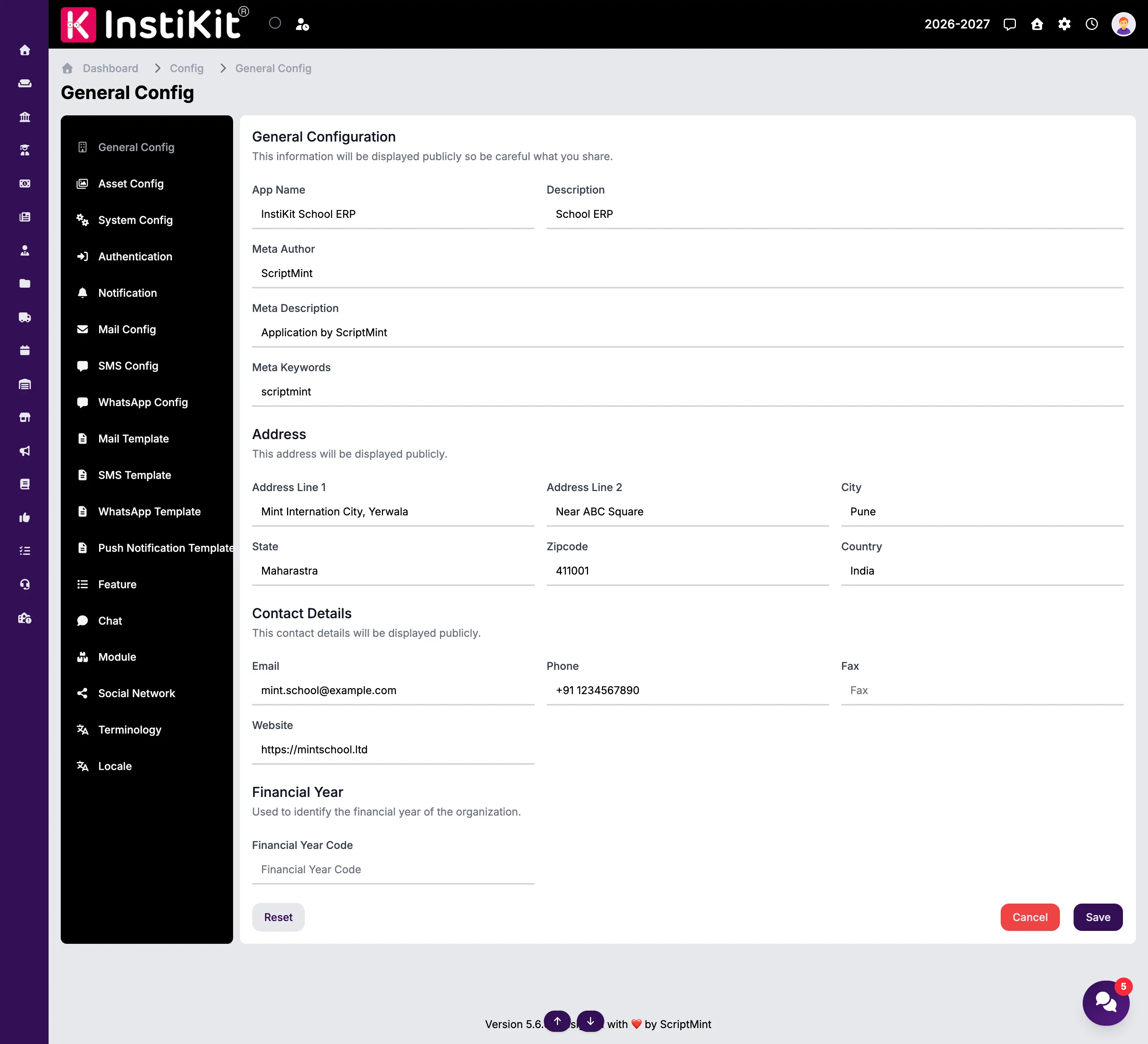
The General Configuration page stores your organization's basic information. These settings are used throughout InstiKit and may also be displayed on reports, receipts, certificates, emails, notifications, and the public website (if enabled).
It is recommended to complete this configuration immediately after installing InstiKit.
Important
Some of the information entered on this page may be displayed publicly, such as on your website, printed documents, emails, or mobile applications. Ensure that all details are accurate before saving.
General Information
These settings define your organization's identity.
App Name
Enter the official name of your organization or institution.
Examples
- ABC Public School
- Green Valley College
- Sunrise International School
This name is displayed throughout the application and on generated reports.
Description
Provide a short description of your organization.
Example
School ERP for managing students, staff, examinations, and fees.
This description may be used in website metadata or other public-facing areas.
Meta Author
Specify the author or organization responsible for the application or website.
This field is primarily used for SEO metadata.
Meta Description
Provide a short summary of your organization.
Search engines may use this description when indexing your website.
Keep it concise and meaningful.
Meta Keywords
Enter keywords related to your organization.
Separate multiple keywords with commas.
Example
school, education, ERP, CBSE, Raipur
These keywords are mainly used for search engine metadata.
Address
Enter your organization's official postal address.
This information may appear on invoices, fee receipts, certificates, report cards, and other printed documents.
Address Line 1
Enter the primary address.
Example
Krishna Kunj, Opposite SP Office
Address Line 2
Enter additional address information if required.
Example
Near Bus Stand
This field is optional.
City
Enter the city where your organization is located.
State
Enter the state or province.
Zipcode
Enter the postal or ZIP code.
Country
Select or enter your country.
Contact Details
Provide your organization's official contact information.
These details may be displayed on reports, emails, receipts, websites, and mobile applications.
Enter the primary email address.
Example
[email protected]
Phone
Enter the primary contact number, including the country code if applicable.
Example
+91 9876543210
Fax
Enter the fax number if your organization uses one.
This field is optional.
Website
Enter your organization's official website URL.
Example
https://www.example.com
This field is optional but recommended.
Financial Year
The financial year is used throughout the application wherever financial records are maintained.
Financial Year Code
Enter a short identifier for the current financial year.
Examples
- FY2026-27
- 2026-27
- FY26
Choose a format that matches your organization's accounting practices.
Saving Changes
After updating the configuration, click Save to apply the changes.
Most changes take effect immediately. However, depending on the feature, some sections of the application may require a page refresh before the updated information is displayed.