Home / Features / Exam Management Software for Schools
InstiKit Feature Category

Exam Management Software for Schools

Keep exam schedules, marks entry, report cards, and competency assessments together so teachers can spend more time supporting students.

Feature Category

Exam Management Software for Schools

Reading time
2 min

Exam Management Software for Schools

Plan school exams, enter marks, prepare report cards, and record competency assessments with customised HPC marksheets generated on demand.

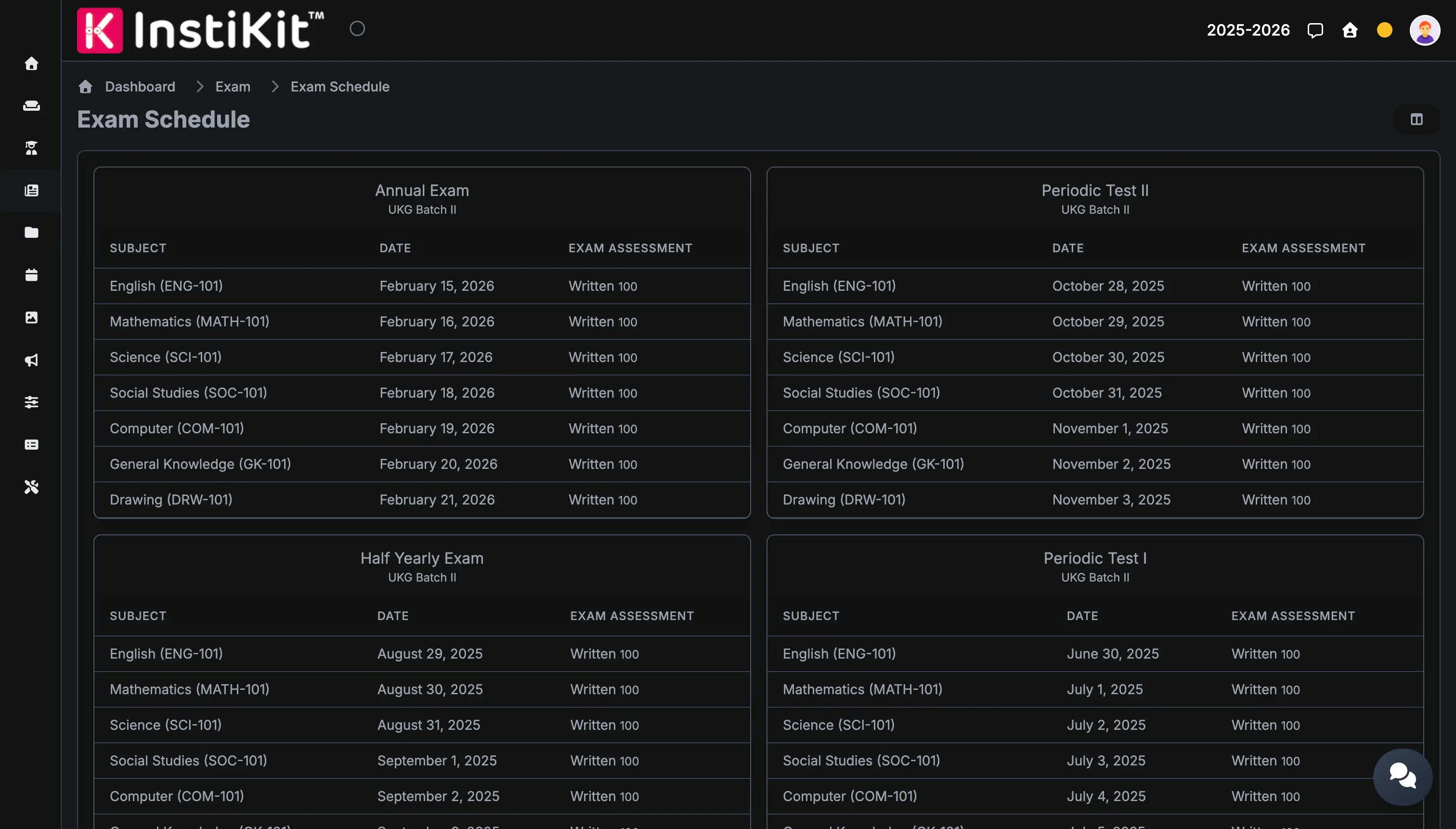
Exam workflow dashboard

Module overview

Built for real school operations

How this module works across daily school operations, which features it includes, and how it connects with the rest of InstiKit.

Manage school exams from planning to report cards

Exam time brings a lot of work for a school. Teachers prepare questions and enter marks. The exam coordinator checks schedules, and class teachers get report cards ready for parents. Keeping these details in separate files makes it harder to know which records are ready.

InstiKit brings this work into one school exam management system. Schools can set up their exams and grading scales, record assessments, and prepare report cards using the same student and class records.

Plan exams around your school calendar

Create terms and exams for the academic year, then set up schedules for the required classes and sections. Add subject dates, start times, and exam durations so staff have the details in one place.

Schools can define assessment components and grade ranges to match their marking pattern. For example, a subject may include a written paper and a practical assessment, each with its own maximum marks.

Keep questions and marks organised

Teachers can maintain a question bank by course, subject, and topic. Questions can include answers, solutions, marks, and difficulty levels, making it easier to find useful material when preparing assessments.

After an exam, teachers can enter marks against each assessment component or import them using the provided Excel formats. Schools can also set a marks entry period with automatic locking to control later changes.

Prepare report cards for students and parents

Process results from the recorded marks and prepare report cards for an exam, a term, or a cumulative assessment, depending on the school's configured marksheet format. Reports can include subject results, attendance, observations, and teacher comments according to the selected layout.

The school controls when marksheets are published. Parents and students can access their reports once the results have been processed and published.

Support competency assessment and HPC marksheets

Schools can also assess students through learning domains and indicators. Teachers record a grade for each indicator, giving them a more detailed record of what a student can do and where help is needed.

For schools using a Holistic Progress Card, a customised HPC marksheet is generated on demand. The format is prepared according to the school's requirements as part of the competency based exam module.

A practical exam cycle

  1. Set up terms, exams, assessment components, and grades.
  2. Prepare class schedules and maintain questions by subject and topic.
  3. Enter or import marks and record competency grades where required.
  4. Check the records, process results, and prepare report cards.
  5. Publish marksheets when the school is ready to share them.

Category highlights

What makes this workflow practical for schools

Exam planning

Set up terms, exams, subject schedules, assessment components, and grading scales for your classes.

Marks and report cards

Enter marks or import them from Excel, process results, and prepare student report cards.

Competency assessment and HPC

Record grades against learning indicators and request a customised Holistic Progress Card marksheet.

Screenshot gallery

See the module across daily use cases

Exam workflow dashboard

Exam workflow dashboard

Keep schedules, marks entry, reports, and review tasks coordinated from one exam operations view.

Who benefits

Useful for every team involved in this workflow

Exam Coordinators

Keep exam work organised

Manage class schedules, marks entry periods, and report card publication from one exam module.

Teachers

Keep student assessments together

Record subject marks and competency grades against the right exam and class.

Parents

Understand your child's progress

View published report cards and discuss learning needs with the school.

Frequently asked questions

Answers schools usually need before moving forward

Yes. Schools set up terms, exams, assessment components, and grades. Teachers enter marks or import them from Excel, and the school can process results and prepare marksheets from those records.

Yes. InstiKit supports exam, term, and cumulative marksheets according to the marksheet format configured for your school.

Yes. Schools can define learning domains and indicators, choose a grading scale, and assign the competency setup to an exam schedule. Teachers then record a grade for each student's learning indicators.

Yes. A customised Holistic Progress Card, or HPC marksheet, is generated on demand as part of the competency based exam module. The format and sections are agreed according to your school's reporting requirements.

Students and parents can access their marksheets after the school has processed the results and published the marksheets.

Yes. Schools can enable automatic locking after a configured marks entry period. Authorised staff can temporarily unlock records when corrections are needed.

Next step

See how InstiKit handles your school exams

Bring your assessment pattern and a sample report card to a personalised demo.